Minecraft Java
 Minecraft Bedrock
 PaperMC
 Fabric
 Forge
 GeyserMC
 Terraria
 Factorio
 Hytale
 Discord bots


Quick answer
- Bedrock 26.60 only connects over NetherNet. Servers still on RakNet can't be joined.
- Update Bedrock Dedicated Server or Geyser to a current build and set
transport=nethernet(Geyser:transport: nethernet). - Make sure the Bedrock port is open for TCP and UDP, then restart. Players connect with the same address and port as before.
What is NetherNet?#
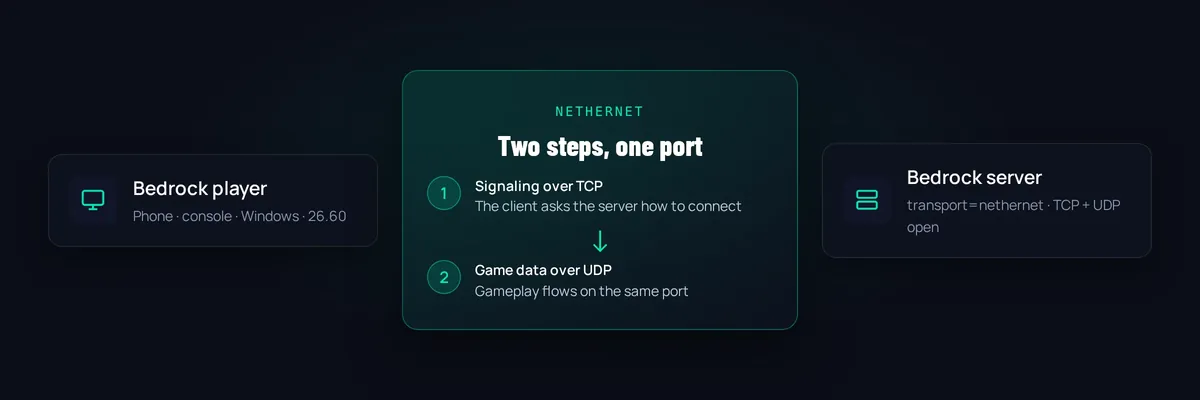
Every online game needs a way for a player's device to find a server and exchange game data. Bedrock Edition used RakNet for that since its early days. It is a UDP-only library that has not been maintained for a long time. NetherNet is Mojang's replacement. It is the same system Bedrock already used for Realms and for joining friends, now extended to dedicated servers.
NetherNet works in two steps:
- Signaling. The player's game asks the server (or a signaling service) how to reach it. For a dedicated server this is a small web request, which is why the port needs TCP.
- Game traffic. After the handshake, the actual gameplay data flows over UDP, as before.
Timeline#
| Version | What happened |
|---|---|
| 26.50 (September 2026) | NetherNet became the default transport for Bedrock Dedicated Server. RakNet still worked. |
| 26.60 (end of October 2026) | RakNet was deprecated. A server that does not use NetherNet now gets an error instead of a warning, and current clients can't join it. |
This is why a server that worked perfectly on Monday could suddenly show "Unable to connect to world" to everyone after the 26.60 update reached their devices.
What server owners must change#
Bedrock Dedicated Server (BDS)#
- Update the server
Download the latest Bedrock Dedicated Server from minecraft.net and replace the program files. Keep your
worldsfolder,server.properties,allowlist.jsonandpermissions.json. - Set the transport
Open
server.propertiesand make sure the line below is present. A leftovertransport=raknetline will no longer work. - Open the port for TCP and UDP
In your firewall and router, allow the Bedrock port (19132 by default) for both protocols.
- Restart and test
Join from a phone or Windows device with your IP and port.
server-port=19132
transport=nethernet
Geyser (Java server with Bedrock crossplay)#
In Geyser's config.yml set transport: nethernet under bedrock: and give Bedrock its own port that is open for TCP and UDP. Geyser builds from around number 1280 convert an old raknet setting by themselves, but older builds keep it, so update Geyser first. The full walkthrough is in our GeyserMC guide.
Don't go back to raknet to "fix" it. Players on 26.60 or newer simply can't use it any more, so it will only lock them out.
What FreeGameHost servers do automatically#
On FreeGameHost the Bedrock server template writes transport=nethernet and the port settings into server.properties every time the server starts, so you can't end up on RakNet by accident. If your server is older, update it:
- Keep Bedrock Version on
latestin the Startup page. - Go to Settings and choose Reinstall Server. The installer downloads the newest server files and keeps your
server.properties,allowlist.jsonandpermissions.json. Your world stays in theworldsfolder. - Start the server and share the address and port shown by the Connect button on the Console page.
Crossplay servers (Paper or Fabric with Geyser) get their own second port with NetherNet already switched on when you tick Enable Bedrock Crossplay at creation.
Common problems after the switch#
"Unable to connect to world"#
Update the server software, check transport=nethernet, and confirm the player uses the Bedrock port, not the Java port. Also check that the server is actually running.
"Outdated server" or "Outdated client"#
The game version and the server version don't match. Either the server needs the newest Bedrock release, or the player's game needs updating.
Works at home, not for friends#
The port is probably only open for UDP, or only forwarded to the wrong device. NetherNet needs TCP as well as UDP on the same port.
Consoles can't join any more#
Consoles don't have an Add Server button, and the DNS trick many people used for it may not work with NetherNet servers yet. Our console joining guide covers what works right now.
Should server owners worry?#
Not really. For most people the whole change is one config line, one port rule and an update. The real casualties are old tools that only know RakNet. If you rely on a third-party plugin or proxy for Bedrock, check that it has a NetherNet release before the next Minecraft update lands.
Frequently asked questions#
What is NetherNet in Minecraft?
NetherNet is the connection system Bedrock Edition now uses to talk to servers. A player first finds the server through a short signaling step over the network, then the game data itself moves over UDP. It replaces RakNet, which Bedrock used since its first versions.
Why do players get "Unable to connect to world" since 26.60?
Their game now only speaks NetherNet, and the server is still on RakNet. Fix the server: update Bedrock Dedicated Server (or Geyser) and make sure transport=nethernet is set. Nothing the player does on their side fixes it.
When did Bedrock switch from RakNet to NetherNet?
According to the Minecraft Wiki, NetherNet became the default transport for Bedrock Dedicated Server in 26.50. In 26.60, released at the end of October 2026, RakNet was deprecated and servers that don't use NetherNet are refused.
Do I need to open a different port?
You still use one Bedrock port, but it now has to be reachable over both TCP and UDP. Before, UDP alone was enough. On FreeGameHost the panel assigns the port and sets this up for you.
What does "Trust on first use" mean?
NetherNet servers announce themselves over plain HTTP unless the owner sets up HTTPS. The first time a player joins, Bedrock asks whether to trust the server and remembers the answer. It is a normal, one-time prompt.
Does this affect Java Edition players?
No. Java Edition still uses its own protocol and port. Only Bedrock clients and the servers or tools that talk to them (Bedrock Dedicated Server, Geyser, and friends-list helpers) are affected.